The system we built for ourselves
This case study is about our own site: xaverPRO, a portfolio of 107 case studies. We built it for ourselves on the same pipeline and with the same discipline we run on client work.
It isn’t a timeline, and it isn’t a “how we spent the spring.” It’s about a system. We took a hard problem (pull a hundred projects out of a tracker, dig the real story out of the chat logs, normalise it, verify it, publish it) and broke it into stages, wired those stages into a pipeline, and tuned each one until it did its job.
That’s the work we sell: take a complex problem, decompose it, build a pipeline to fit, and stand behind what comes out the far end. Our own site was just a problem we handed ourselves. What follows walks the system stage by stage.
At a glance
| Field | Value |
|---|---|
| Project type | Internal project — our own portfolio site |
| Format | For our own use |
| Target reader | SEO / marketing agencies (US / UK / UAE) sizing up a white-label WordPress dev partner |
| Scope | 107 published case studies · 22 pages · 5 essays · 7 industry pages · 5 pillar pages |
| Project dates | 09.02.2026 – 22.05.2026 (103 days) |
| Active development | ~35 days (a 2-month gap sits between the foundation and the main run) |
| Effort | ~400 hours |
| Team | 4: Anton Hersoun + Claude Opus 4.7 (orchestrator) + Claude Sonnet 4.6 (subagents) + DeepSeek v4 Pro/Flash via OpenCode |
| Stack | WordPress 6.9 · Astra free 4.13 + xaver-pro child theme · PHP 8.4-fpm-alpine · MariaDB 11.4 · Redis · nginx · Rank Math · a shell deploy pipeline · Python case tooling |
| Delivered | A working site (xaverPRO), 107 published case studies, a server-rendered theme, a content-only deploy, ~30 Python scripts, ~12 Claude skills |
| Commits | 823 on feature/ai-importer |
| Theme versions | v0.1.0 → v1.0.556 |
The pipeline in one diagram
We start every hard problem the same way: break it into stages and watch how the data moves from one to the next. Here is this problem in a single picture. Five stages, data flowing one direction, from the task tracker to the finished site. Each stage does its job and hands off to the next.
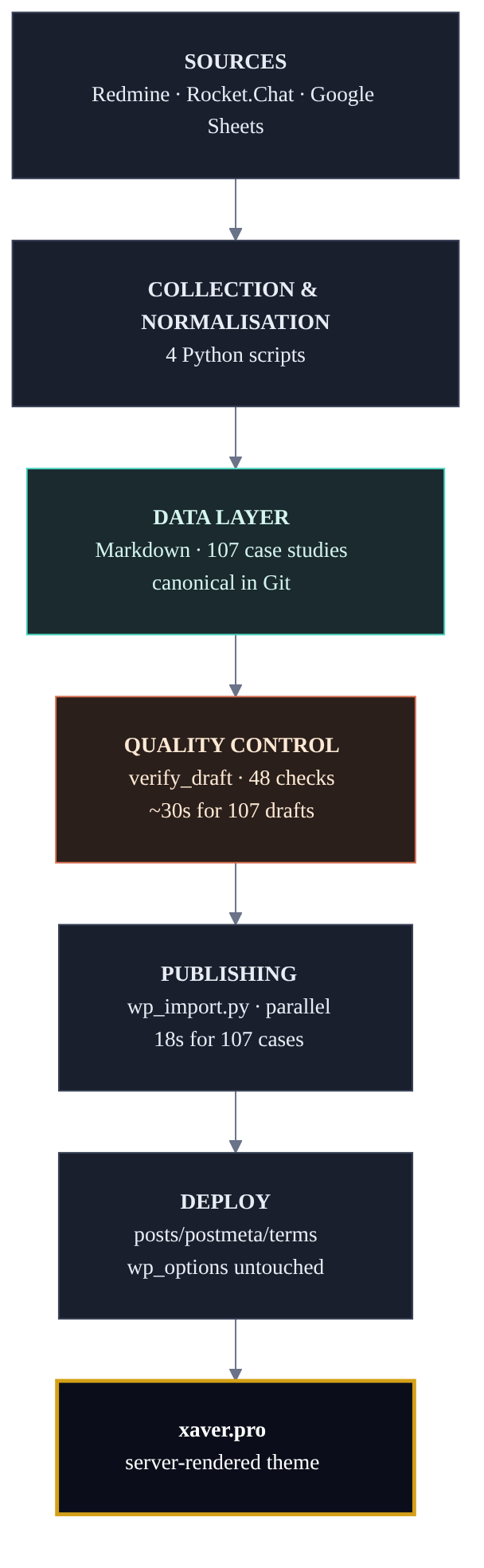
- Source of truth: Redmine. The history of tasks, hours and statuses for 112 projects exports to JSON. From there a deterministic parse: type of work, agreed hours, who was on the team.
build_matrix.pysorted all 112 projects by priority in 47 seconds: 52 into the first tier, 54 into the second, 6 dropped. - Context extraction: Rocket.Chat. Out of thousands of messages per project, sometimes tens of thousands, a filter keeps the dozen that actually matter. The first pass was a naive set of regular expressions and surfaced 25 signals where there were well over a hundred. A proper keyword model fixed that and lifted coverage to 100+ relevant messages per project.
- Normalisation and generation: LLM. DeepSeek v4 and Claude subagents assemble a markdown draft against a strict template per work type: Rebuild, Build, Templated, Refresh, Redesign, Other. The template isn’t a creative brief. It’s a contract: which sections, in what order, with which required fields.
- Quality control: Python.
verify_draft.py, 48 checks: are the agreed hours there, is the URL alive, has the text drifted into boilerplate, did any credentials leak. A secret-scrubber found and cut 19 fragments in the first case alone: passwords from chats, staging links, personal accounts. - Delivery: a batch content deploy. An atomic transaction, three URL-rewrite passes, an eight-step check, primary-key isolation. One script, one config source.
That’s the whole system. Next, each stage on its own: where it hit its limit and how we tuned it to where it needed to be. We’ll start with the last one, delivery, because it decides whether the work reaches the live site intact.
The delivery stage: a deploy that never touches the live site
The most nerve-wracking part of handing a deploy to a contractor is that the next content update will overwrite something that lives only on the live site: active plugins, SEO settings, indexing flags. One deploy like that, and after every sync someone restores the configuration by hand. For an agency this isn’t theory. It’s a plain question: do you let a contractor near the client’s live site at all.
The spec for this stage is strict: touch only posts, metadata, terms and taxonomies, and nothing else. The wp_options table, with Rank Math settings and the plugin list, stays untouched. The logic is simple. Content and configuration live on different clocks. Content changes every day; configuration changes rarely and on purpose. Mixing them into one deploy means risking the configuration for the sake of the content every single time.
The first approach didn’t hold up. A targeted SQL dump for the right post types would have worked for one deploy, but the next would need another parse and another dump. We threw out the targeted files, wrote a single script with predictable logic, and immediately saw the risk of a primary-key conflict.
Here is the conflict. A live posts table holds more than our records. Flamingo, the Contact Form 7 submission store, drops its own posts into the same table as the editorial content. A deploy that overwrites posts by their IDs will sooner or later land on a stranger’s record sitting on an ID it wants. Fixing that after the fact is a poor strategy for anything that runs against a live site.
So we removed the conflict by construction, not by probability. Editorial content took IDs 1 to 999,999. Live-site data (Flamingo and any other plugin that piles up records in use) moved to the range above 1,000,000, and we pinned the posts table’s auto-increment to 1,001,000. The two ranges have nowhere left to overlap. Not “unlikely.” Impossible.
The final run came through clean: 1.7 MB of atomic SQL, 107 case studies, 7 canonical taxonomies in a single pass. Two control re-runs the same night came in under 2 minutes each, both green, the second already sending a per-stage report to Telegram.
The scaling problem: 17 minutes to 18 seconds
17 minutes for a full re-import of 107 case studies. 20 docker exec calls per case: post body, metadata, featured image, mobile image, taxonomies. We put up with it for 2 weeks. That was a mistake. At 20 posts it’s bearable; at 107 it’s a roadblock. You fix one case and wait 3 minutes for that one case.
The refactor collapsed 20 calls into one. wp eval-file runs a PHP script directly inside WordPress: every edit for a case in a single script, passed through a mounted folder, with no copying into the container. Add a thread pool sized to the work, and 17 minutes became 18 seconds. 54 times faster.
The number 54 became shorthand for us, and not because it’s a tidy number. The 17 minutes were never the real problem: one or two re-imports a day could absorb them. The 18 seconds changed something else. Not the speed of the task, but the shape of the work. Re-import became free, a regression shows the instant it appears, and iterating stopped costing time.
This is the principle the whole system grew on: a tool is born from pain, not from a plan. We did the first case by hand, step by step, because otherwise every automation would have stood on an unproven method. Then we ran the same method across 5 projects with parallel agents. Then came build_matrix.py, which sorted 112 projects in one run. Then verify_draft.py with its 48 checks, because the agents made mistakes in predictable places. Every tool was an answer to a bottleneck the previous step exposed.
Managing tech debt: where we stopped
The efficiency you need isn’t always the maximum. A team’s maturity shows less in squeezing every metric to its ceiling and more in knowing where to stop and marking the line, so the next developer doesn’t run into the same wall.
The mobile PageSpeed 100 that doesn’t exist. On large screens the site held 100. The mobile score sat at 99, and that one point looked like the last mile. The technique is well known: extract the critical CSS, inline it, load the rest asynchronously. Before the attempt we built a safety net, a visual-regression rig: Playwright capture across 28 URLs at 5 breakpoints, pairwise comparison with three algorithms (perceptual and difference hashing, structural similarity), tiled. Calibration gave 0 mismatches out of 140 pairs. The extraction tool pulled 28 KB of critical CSS out of 262, a reasonable share.
The deploy immediately exposed an incompatibility nobody had noticed. The header loads its font with font-display: optional, and the font’s load window rides on render-blocking CSS. Inline the critical CSS and parsing turns instant: the window collapses, the browser takes the fallback font, the heading wraps onto 2 lines, and layout stability jumps from 0.021 to 0.174. We reproduced it on 2 runs with a warm cache. A pattern, not a fluke.
Fast mobile render and zero layout shift turned out to be mutually exclusive under the current font architecture. Load order doesn’t fix it; it needs a full font rebuild, a separate task with its own risk of breaking other things. The decision: keep mobile at 99 with layout stability in the green. That’s a stable optimum, not a compromise. We measured the boundary, wrote it into the design kit, and archived the proof of concept. We were not going to break the live site for a 100 in someone else’s report.
The real 100/100/100/100 on large screens came from another direction. We dropped 2 unused JavaScript files from the parent Astra theme, and render-blocking fell from ~70 ms to zero. We didn’t game the number. We removed the dead weight.
Consolidation is design too, and often deeper than new elements. Over a month overrides.css had swollen to nearly 9,000 lines, and about 40% was duplicated across the namespaces for 5 case types. The symptoms were visible to the eye: an eyebrow above a heading 10 px on one service page and 11 on another, 2 pages missing the background variable, a long dash drawn twice (once as a character in the text, once as a CSS pseudo-element). We replaced it with universal .xpro-* components: one .xpro-hero instead of five, one .xpro-cta-band for every CTA, a per-page modifier overriding only the accent. Eight phases closed in one session, because half a consolidation gives half the benefit and the workarounds creep back. The visible result was 242 lines removed; the real complexity dropped further. Seven industry hubs now run on one template instead of seven near-identical copies.
Scalability isn’t having a lot of pages. It’s being able to add a new one without touching the old ones.
The boundary: we don’t do SEO
Plainly: we don’t sell SEO. But the development foundation is laid strictly to the requirements of modern search algorithms, because otherwise a 200-page site simply isn’t visible. That’s part of the engineering, not a separate service, and we hold the line in the open.
How we treat SEO advice is best shown by one episode, and it isn’t a flattering one. We ran the first version of an optimisation plan through four independent checks against current literature. Four tactics, each presented as “progressive practice,” turned out on inspection to be ways to actively damage rankings:
- a
CaseStudytype in Schema.org markup: no such type exists, the markup is invisible to snippets; - shuffling 5–6 structural blocks to fake originality: exactly the marker Google uses to flag content as machine-made;
- bumping the modified date with no real edits: “date stuffing,” which has drawn a manual penalty since 2023;
- auto-interlinking on entity matches 3 or more times: link-farm topology.
We threw out plan v1 entirely. v2 kept only what works on 2024–2025 algorithms: Person and Organization markup, consistent signals across pages, meaningful anchor text instead of “click here,” Article on the case studies, and “experience fingerprints” (the E-E-A-T idea): a paragraph with a real problem and a sentence justifying the decision in every case.
The takeaway here isn’t about SEO. It’s about method. Any advice from an open source passes one filter with us: does it work today, or does it draw a penalty? SEO changes faster than the guides on “how to do SEO” go stale. We hold that same filter against any outside advice, not just search.
What we built and didn’t use
An honest case shows more than the wins. For the first 6 days we stood up an MCP federation of 219 tools: three servers behind one token-gated endpoint (71 + 3 + 145). Clean work: Docker resource limits, connection reuse via keep-alive after the memory watchdog started killing processes on the first evening, swapping a heavy theme for the lighter Astra to save memory.
And then it went unused. When the real work started in April, every admin operation ran through mcp-ssh, which turned out to be far faster. The federation just sat there: working, untouched, off the critical path. We wrote the lesson down honestly. Good infrastructure doesn’t require that you use it. Sometimes a well-built node turns out not to be the axis the work runs on, and that’s a normal outcome, not hours written off. What matters is seeing it in time and not dragging a dead channel into the main system just because it’s already built.
The principles that stuck
These aren’t conclusions about our site. They’re how we approach any system, and they hold the same on your problem.
- A tool is built from pain, not from a plan. By hand first, then automation, then refinement against the problem the automation itself exposed.
- A clean check isn’t a clean result. Automated checks catch the mechanical; a human still reads the whole thing, not just the diff.
- Content and configuration live in different layers. A deploy that mixes them will eventually overwrite the live site’s settings.
- It’s more honest to measure a boundary than to route around it. Mobile 99 with green CLS beats a 100 bought with shifting layout, and there’s a record of it in the design kit.
- The decision stays with a person. No critic, no linter, no model is taken on faith.
If you have a problem like this
You’ve seen how we took our own problem apart. If you have one of your own (a complex site, a content pipeline, a system that has to be assembled from several stages and driven to a result), send us your current stack: the CMS, the data sources, how the deploy is set up. We’ll look, find the bottlenecks, and come back with a fixed estimate in hours. The audit is free.
Don't have a spec yet? Send a one-paragraph description — we'll come back with the questions worth asking. Send a description →
Numbers
Scope of work
- Calendar: 09.02.2026 → 22.05.2026 = 103 days (~35 of them active; a 2-month gap between the foundation and the main run)
- Commits: 823 on
feature/ai-importer - Branches: 5 (main plus four topic branches: theme migration, case generation, AI importer, gateway federation)
- Planning docs closed: 106 in
plan/done/ - Docs in
docs/: ~25 files (design kit, deploy guide, marketing material)
Content
- Published case studies: 107
- Static pages: 22
- Insight essays: 5
- Industry pages: 7
- Pillar pages (case types): 5
- Coverage of the 112 Redmine projects: 100% (52 high-priority + 54 second-tier + 6 skipped; project 23 split into 23.1 and 23.2)
Tooling
cases/scripts/: 30+ Python scripts (build_matrix, verify, wp_import, audit, sync, redact, fetch_sheet, and more)scripts/deploy/: 8+ shell scripts (full_deploy.sh,content_deploy*.sh, verify, profile, and more)- Theme
xaver-pro/: ~60 PHP files, server-side render, 11 page templates + 5 single-case templates + universal.xpro-*components
Deploy and scale
- Corpus re-import: 17 minutes → 18 seconds (54× speedup)
- Primary-key ranges: editorial content 1–999,999, live-site data above 1,000,000
- PageSpeed at launch: 66 → 99/99/100/100 (WebP conversion of 2,235 files, −86.6% image weight)
- OpenCode on DeepSeek: ~190 atomic units over 5+ rounds, ~$2–4 total